Invoice Center
Entry: user menu → “Invoices”. Only successfully paid membership orders can be invoiced; several orders may be merged into one invoice.
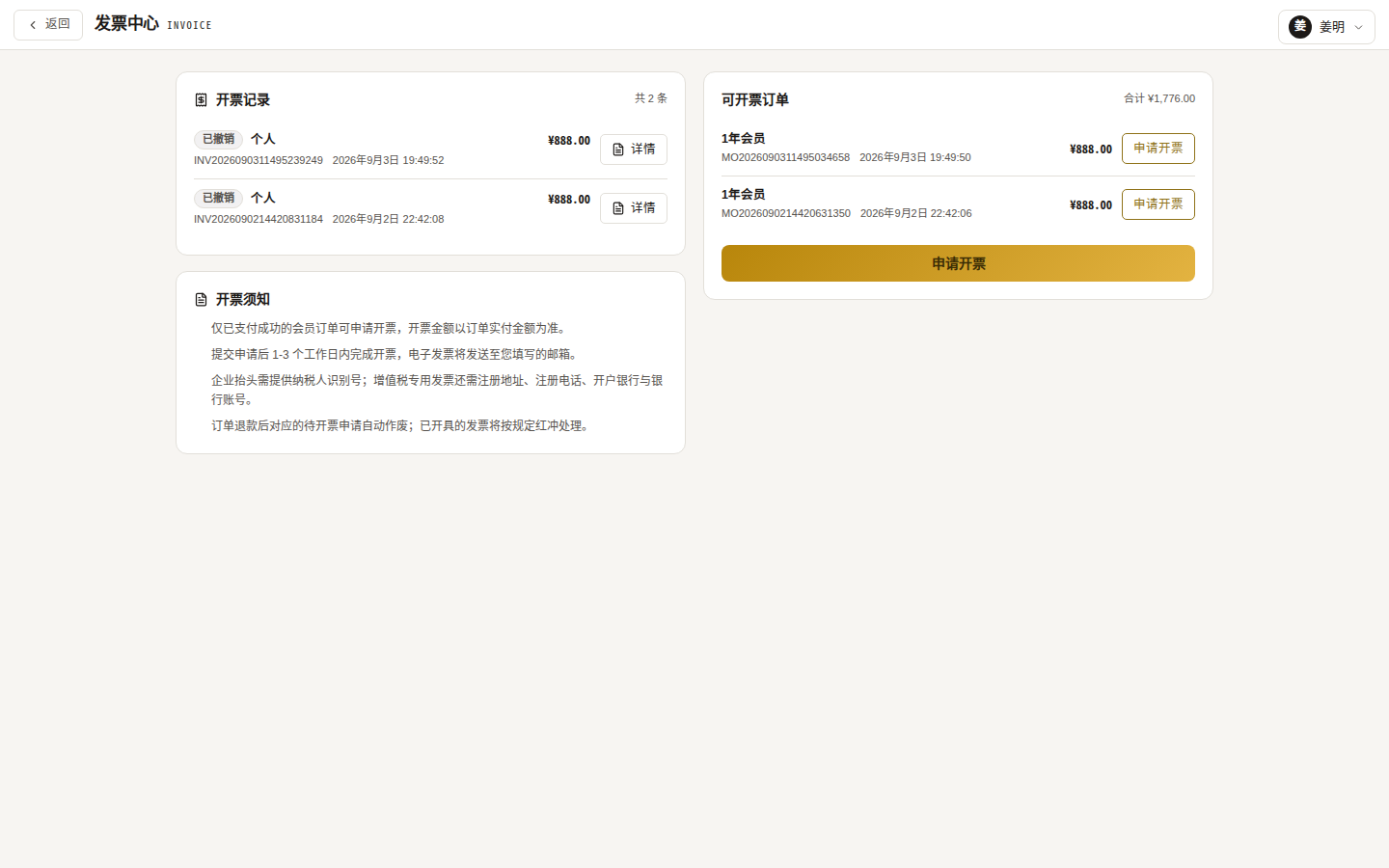
Layout
- My invoices: history with statuses (Pending / Issued / Rejected / Cancelled / Voided); you can cancel requests and view / download issued files;
- Invoiceable orders: paid orders without an invoice; tick several to merge.
Applying (3 steps)
- Select orders: tick one or more paid orders to merge;
- Fill the title:
- Type: general e-invoice / VAT special invoice (special invoices require a business title);
- Title: personal / business; business titles need a tax number (15–20 alphanumerics), registered address / phone, bank / account number and receiving email;
- Frequently used titles can be saved and set as default;
- Confirm: content defaults to “Membership fee”; the amount is the sum of selected orders as actually paid.
Status flow
| Status | Meaning |
|---|---|
| Pending | Submitted, waiting for the platform |
| Issued | Done — download the invoice file |
| Rejected | Platform rejected (reason shown); fix and re-apply |
| Cancelled | You withdrew it; orders released for a new request |
| Voided | Issued then voided (red-flush); orders released |
An order can belong to only one invoice at a time; rejected / cancelled / voided invoices release their orders.